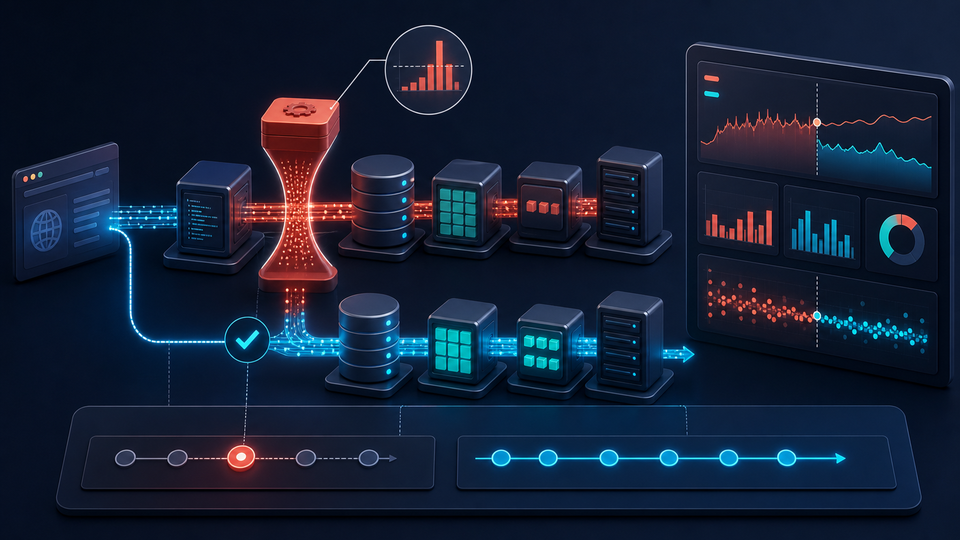
A slow Laravel application is rarely fixed by changing one setting, installing a package, or adding another server. The delay may begin in a SQL query, an external API, a full PHP-FPM pool, an uncached calculation, a large response, or an overloaded network dependency. Every one of those problems feels the same to a user: the page takes too long to respond.
Effective Laravel performance optimization therefore starts with evidence. An experienced developer traces the complete request, finds where time and resources are being consumed, changes the smallest useful part of the system, and measures again. That approach improves speed without hiding the real bottleneck behind more infrastructure and a larger monthly bill. When response time is affecting crawlability or search experience, the broader PHP SEO guide connects server performance with URLs, response codes, metadata, and indexing.
What Causes a Laravel Application to Become Slow?
Laravel is only one stage in a production request. A browser may first negotiate DNS and TLS, fetch an uncached asset through a CDN, reach a load balancer and web server, wait for an available PHP process, bootstrap Laravel, query a database, consult a cache, call another company’s API, render a view, and transfer the response. Latency at any stage increases the total.
This is why Laravel itself is rarely the sole performance problem. An endpoint can spend 100 milliseconds executing application code and 1.4 seconds waiting for database operations. A checkout may be fast until a payment or shipping API slows down. A page can leave the server quickly but still feel sluggish because it downloads oversized JavaScript and images. Diagnosis must follow the whole path rather than the framework boundary.
1. Measure Laravel Performance Before Optimizing
Start with a baseline that describes normal behavior. Record response time by endpoint, p50 and p95 latency, throughput, database query time, slow queries, CPU, memory, error rate, background-work depth, and external API latency. Averages alone can hide the experience of the slowest users, so percentiles and traces are especially useful.
Laravel Telescope is valuable in development and controlled staging environments because it exposes requests, queries, jobs, exceptions, cache activity, and outgoing HTTP calls. Production systems usually need lower-overhead application-performance and infrastructure monitoring. Correlation IDs, structured logs, database slow-query logs, and distributed traces help connect an individual slow request to the service that consumed its time.
Establish a repeatable scenario before changing code: the endpoint, representative data volume, authenticated role, cache state, traffic level, and measurement window. Then make one meaningful change and compare the same scenario. This avoids declaring a win because a warm cache, a small development database, or an unusually quiet server made one request appear faster.
Give each important user journey a performance budget. A search page, dashboard, checkout, and export do not necessarily need the same target, but each should have an agreed response threshold and data scale. Separate server response time from browser rendering time so the responsible layer is clear. When a regression appears, compare application releases, traffic, database growth, and provider behavior during the same window. This converts “the site feels slow” into an investigation with boundaries.
2. Find Slow Database Queries
Database work is often the largest opportunity in a slow Laravel application. Inspect both the number of queries and their execution plans. Common causes include missing indexes, inefficient joins, repeated lookups, unnecessary columns, expensive sorting, large result sets, relationship queries that expand unexpectedly, and connection overhead between the application and database hosts.
Capture slow queries under realistic load, then use the database’s execution-plan tools to see whether it scans a table, uses an index, creates temporary results, or sorts more rows than expected. Laravel’s query listener can help during targeted debugging, but broad production query logging should be used carefully because it can add overhead and expose sensitive bindings.
Retrieve only the columns the response needs. Filter early, avoid loading an entire relationship merely to count it, and let the database perform set-based work instead of looping through thousands of models in PHP. For large lists, paginate. Cursor pagination is often a better fit than deep offset pagination when records have a stable ordered key and users move sequentially through data.
Also examine data shape and growth. A query that appears harmless with 5,000 local rows may become the dominant request cost at five million rows. The broader guide to PHP performance bottlenecks and fixes explains how database, runtime, network, and payload costs interact beyond Laravel itself.
Connection placement matters as well. Repeatedly opening remote database connections or placing application and database hosts across high-latency network boundaries adds delay to every round trip. Connection pooling or persistent behavior must match the runtime and database limits, however; retaining too many connections can trade request latency for database exhaustion. Measure connection acquisition separately before changing pool sizes.
3. Eliminate Laravel N+1 Query Problems
Eloquent makes relationships pleasant to read, but seemingly harmless property access can create a query for every model. This example loads all orders, then lazily loads the customer for each order:
$orders = Order::all();

foreach ($orders as $order) {
    echo $order->customer->name;
}
One query retrieves the orders and then N additional queries retrieve customers. With ten orders the problem may be invisible; with thousands it can overwhelm the database and network. Eager loading retrieves the related records in a bounded query set:
$orders = Order::with('customer')->get();Use constrained eager loads and selected columns when the relationship is large, and enable lazy-loading prevention in development where appropriate so accidental N+1 behavior fails visibly. Do not assume eager loading everything is better: oversized object graphs consume memory and transfer data the response may never use. The goal is the right data in a predictable number of queries.
4. Add Database Indexes Where They Actually Matter
Index foreign keys used in joins, fields frequently used for selective filtering, lookup identifiers, and columns that support important ordering. Composite indexes can help queries that repeatedly filter and sort by the same column sequence, but column order matters. Confirm the result with the actual execution plan rather than merely confirming that an index exists.
Adding indexes everywhere is not Laravel database optimization. Every index consumes storage and adds work to inserts, updates, deletes, backups, and maintenance. Low-selectivity fields may provide little benefit by themselves. Review production query behavior, choose indexes for valuable access patterns, and measure read improvement against write cost.
5. Use Laravel Caching Strategically
Cache data that is expensive to produce, requested frequently, safe to reuse, and governed by a clear freshness rule. Good candidates include reference data, aggregate counts, expensive report fragments, permission-independent API responses, and rendered results that change less often than they are read. Laravel’s cache abstraction makes the storage driver replaceable, but it cannot decide whether stale data is acceptable.
Define the cache key, ownership boundary, lifetime, invalidation event, and behavior during a miss before implementation. Prevent cache stampedes when many requests can regenerate the same costly value. Never cache sensitive or user-specific information under a shared key, and remember that caching a poor query can conceal it until eviction causes a sudden performance cliff.
Laravel also provides deployment-time caches for framework metadata:
php artisan config:cache
php artisan route:cache
php artisan view:cache
Run these as part of a verified production deployment process and confirm the application does not depend on unsupported runtime environment access or unserializable route definitions. They reduce repeated framework work, but they cannot compensate for poor queries, blocking integrations, or oversized responses.
6. Using Redis With Laravel
Redis can serve application cache entries, sessions, rate-limit counters, frequently requested temporary data, and—where the operating model supports workers—queued messages. Moving short-lived, high-frequency reads away from the relational database can reduce contention and preserve database capacity for durable business transactions.
Redis is another production dependency, not a magic speed switch. Monitor memory, eviction policy, hit rate, connections, command latency, persistence choices, replication, and failover. Decide what happens if Redis is unavailable. Session storage requires a different durability conversation than a recomputable page fragment, and unbounded keys can turn a performance improvement into an outage.
7. Move Expensive Work Out of Interactive Requests
Users should not normally wait while the application sends email, processes images or video, generates a large report, delivers a webhook, imports a file, synchronizes an API, or fans out notifications. Separating that work often improves perceived performance more than low-level code tuning.
A conventional Laravel deployment may record a queue job and let supervised workers process it. Other self-contained deployments deliberately avoid persistent queue workers; they can start an authenticated, detached server-side process, respond with an operation identifier, and let the interface poll for status. Either model must define idempotency, retries, timeouts, concurrency, progress, failure visibility, and recovery. Moving work elsewhere without operational ownership only moves the bottleneck.
For systems that do use queues, isolate workloads with different urgency and resource demands, protect downstream services, and monitor wait time rather than job count alone. The detailed guide to Laravel queue performance and scaling covers those tradeoffs.
8. Optimize External API Integrations
Perfect PHP and SQL cannot make a request fast if it waits several seconds for another company’s API. Measure DNS, connection, TLS, first-byte, and total request time separately when possible. Set explicit connection and response timeouts; an absent timeout lets one unhealthy provider occupy PHP capacity until the infrastructure fails around it.
Retry only transient failures, use exponential backoff with jitter, and ensure repeated operations are idempotent. Cache safe responses, respect rate-limit headers, and use circuit-breaking behavior so a failing dependency does not cascade through every user request. Prefer webhook-driven updates over constant polling when the provider offers reliable webhooks. For work that need not finish before the response, use the background-processing model appropriate to the deployment.
Third-party flows deserve targeted logging around request purpose, duration, status code, provider request ID, retry count, and a safely redacted response. This makes slow integrations diagnosable without leaking tokens or customer data.
9. PHP and PHP-FPM Performance
Run a supported PHP release, enable and size OPcache for the deployed codebase, and verify that deployments invalidate code safely. PHP-FPM needs enough workers for observed concurrency, but each worker consumes memory. Too few workers create a queue at the web tier; too many can exhaust RAM, increase swapping, or overload the database.
Size worker limits from measured process memory, available capacity, request duration, and downstream constraints. Review slow logs, max-request recycling, memory limits, filesystem latency, and container or host CPU throttling. Raising the PHP memory limit may stop an immediate error while allowing inefficient processing to consume more of the server, so treat it as a capacity decision rather than an optimization.
10. Laravel Performance on AWS
A Laravel workload on AWS may use EC2 or ECS for application compute, an Application Load Balancer for traffic distribution, RDS for relational data, ElastiCache for Redis, S3 for object storage, CloudFront for edge delivery, and CloudWatch for metrics, logs, alarms, and dashboards. The correct architecture depends on traffic, failure tolerance, team capacity, and budget—not on how many services can be added to a diagram.
Keep application compute and its database in appropriately connected regions and networks, use connection reuse carefully, serve static assets from S3 and CloudFront where appropriate, and scale stateless application capacity from meaningful signals. Database CPU, locks, connections, IOPS, cache hit rate, target response time, and load-balancer errors often explain more than instance CPU alone.
Scaling infrastructure before fixing inefficient behavior can simply make inefficient software more expensive. A missing index multiplied across ten application tasks still sends waste to the same database. Our Laravel and AWS DevOps services connect application diagnosis to deployment, infrastructure, and production monitoring rather than treating the cloud as a separate concern.
11. Monitor the Application After Deployment
Performance work continues after release because traffic patterns, data volume, providers, and product behavior change. Track endpoint latency, throughput, database time, CPU, memory, failures in background operations, error rate, HTTP 5xx responses, cache behavior, and external dependency latency. Alert on symptoms that matter to users and operators, not every harmless fluctuation.
Compare deployment markers with telemetry and define a rollback threshold before risky changes. Synthetic checks show whether a critical path works when no customer is using it; real-user monitoring shows what browsers and networks actually experience. Review capacity trends periodically so growth is handled before saturation becomes an incident.
12. When Should a Business Optimize Its Laravel Application?
Optimization is justified when pages become noticeably slower, database CPU or connections climb, infrastructure costs rise faster than usage, timeouts appear, background work backs up, users complain about responsiveness, or reports take progressively longer. Traffic growth often exposes bottlenecks that were always present but invisible at smaller scale.
A structured performance review is also valuable before a major campaign, integration, migration, or expected data increase. The Laravel maintenance and support process should include trend review and performance regression detection, while a mature Laravel development process gives important endpoints explicit performance expectations before release.
Laravel Performance Optimization Checklist
- Establish a repeatable performance baseline and useful latency percentiles.
- Identify slow endpoints and trace where their time is spent.
- Inspect SQL count, duration, execution plans, and returned data volume.
- Eliminate accidental N+1 queries without overloading memory.
- Review indexes against real filters, joins, sorts, and write costs.
- Measure external API latency and set explicit timeouts.
- Cache appropriate data with ownership, freshness, and invalidation rules.
- Move expensive work out of interactive requests using an operable processing model.
- Enable verified Laravel configuration, route, and view caches in production.
- Review PHP, OPcache, and PHP-FPM settings against measured traffic.
- Measure infrastructure utilization and downstream capacity before scaling.
- Monitor the application after deployment and watch for regressions.
Why Faster Laravel Applications Are Usually Better Architected Applications
Performance engineering is not primarily about clever code. A dependable Laravel application avoids unnecessary work, retrieves data efficiently, separates interactive requests from expensive processing, caches results with clear consistency rules, protects external dependencies, and exposes enough telemetry to explain production behavior.
Those qualities make software easier to operate and less expensive to scale. They also make future development safer because the team can see whether a change improved the system or moved cost somewhere else. Businesses evaluating Laravel application development services, custom Laravel development, or a Laravel development company should look for this production discipline—not only framework familiarity.
Diagnose the Bottleneck Before Rebuilding or Scaling
Custom PHP Design helps businesses diagnose, optimize, modernize, and operate production Laravel and PHP applications. Our work can span Laravel and SQL through Redis, background processing, APIs, PHP configuration, AWS infrastructure, CI/CD, and monitoring. We also provide broader custom PHP development services when performance work reveals an architectural or integration constraint that requires focused implementation.
If an existing Laravel application has become slow, unstable, or increasingly expensive to operate, the first step is identifying the actual bottleneck. Contact Custom PHP Design to discuss a production performance review and a measured path from evidence to improvement.