01
Discover
- Map the application
- Review dependencies
- Identify critical workflows
- Inventory integrations
- Document deployment and hosting
- Identify SEO-sensitive routes
Legacy PHP modernization
Older PHP and Laravel applications often contain years of valuable business logic, customer workflows, data, and search visibility. We stabilize, upgrade, and modernize those systems in controlled phases so the business can keep operating while the software improves.
Recognize the pattern
They become harder to change, slower to deploy, more expensive to support, and increasingly dependent on knowledge that may exist only in one person’s head.
Production incidents keep returning
!Small changes create unexpected bugs
!The PHP version is unsupported
!Deployments are manual or stressful
!Tests are missing
!Hosting is difficult to manage
!Logic is duplicated across the application
!Integrations fail without visibility
!Search traffic depends on old URLs
!No one is confident enough to upgrade it
!Our position
A full rewrite can create more risk than it removes. Business rules are often hidden inside years of production code, edge cases, reports, integrations, and customer workflows.
We begin by understanding what already works, reducing immediate risk, and creating a practical modernization path.
Modernization is not replacing everything. It is improving the system without losing what the business depends on.
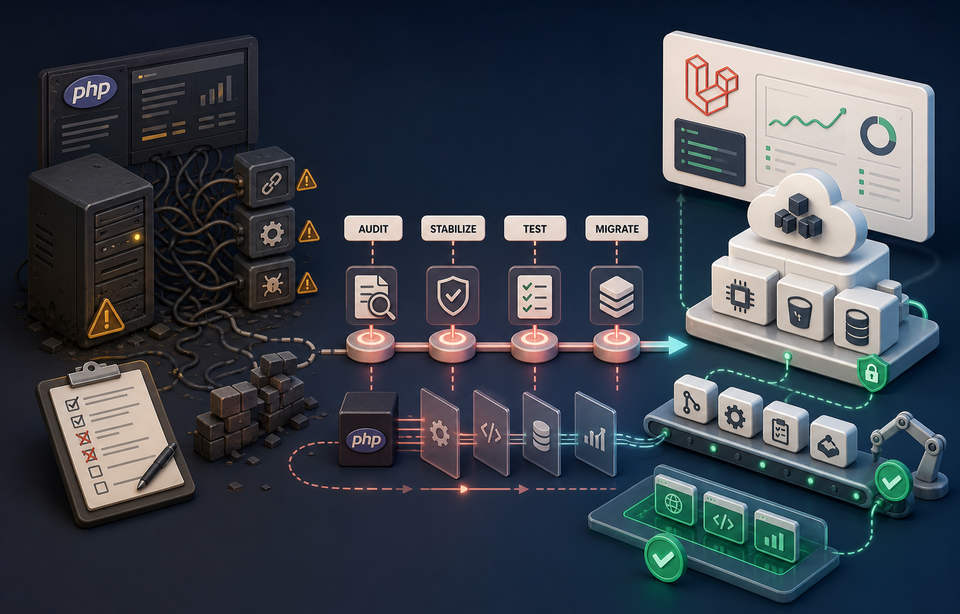
The modernization journey
Each phase creates the confidence required for the next. The application remains useful while risk is reduced and delivery improves.
Start with the highest risk
A useful roadmap is driven by business exposure, not by whichever part of the codebase looks oldest.
Error handling · Logs · Slow requests · Failed jobs · Database issues · Dependency problems · Recurring incidents
Compatibility review · Dependency upgrades · Deprecated feature removal · Phased framework migration · Automated testing · Staging validation
Service boundaries · Duplicated logic · Controllers and domain logic · Background jobs · API structure · Maintainable workflows
Git workflow · CI/CD · Staging · Deployment automation · Rollback · Monitoring · Backups · Incident visibility
EC2 · ECS · RDS · S3 · CloudFront · Queues · Secrets · Environment isolation
URL inventory · Canonical strategy · Redirects · Sitemap validation · Structured data · Crawl monitoring · Broken-link prevention

Modernization in practice
Historical Text Archive contained a large body of historical content, long-lived URLs, thousands of media files, and existing search visibility. The goal was not to replace everything. It was to modernize the platform without damaging the archive.
Laravel modernization, route and canonical review, structured data, sitemap improvements, media cleanup, crawlability, indexing support, performance work, and migration planning.
Preserving URLs and content, avoiding migration loss, maintaining search visibility, handling thousands of assets, and improving incrementally.
Choose deliberately
A rewrite may still be right when the current system cannot support the business model—but that decision should follow discovery, not precede it.
One practical starting point
The audit reviews runtime and dependency health, architecture, recurring bugs, database performance, deployment, hosting, security, integrations, route preservation, and documentation.
Hosting and infrastructure
Applications become difficult to maintain when hosting is shared, undocumented, or tightly coupled to manual server changes. The right path may improve the existing server, introduce a controlled VPS, move to AWS, separate application and database layers, add staging, or automate deployments.
Production ownership
Legacy software may support revenue, customers, reporting, or internal operations. Every release needs preparation, visibility, and a practical route back.
Ways to begin
The starting point should match the immediate risk and the amount of clarity already available.
Recurring bugs, outages, security concerns, or deployment risk.
Typical outcomeA more stable system, better visibility, and a prioritized roadmap.
Unsupported PHP or Laravel versions and dependency risk.
Typical outcomeA controlled version upgrade with validation and deployment planning.
A business-critical application that needs ongoing architectural improvement.
Typical outcomeSteady improvements without stopping normal business operation.
Teams that need clarity before committing to a larger project.
Typical outcomeA risk summary, modernization plan, and practical next steps.
Questions before changing a critical system
Start with the system you have, the risks you know, and the workflows the business cannot afford to lose.
Not by default. A rewrite can be appropriate, but the decision should follow discovery. Stabilizing and modernizing in phases often protects working business rules while reducing risk sooner.
Yes. Runtime upgrades, security work, database tuning, deployment improvements, testing, and back-end refactoring can happen without redesigning the customer-facing interface.
Yes. A phased migration can preserve routes and workflows while selected modules move behind clearer Laravel boundaries.
Yes. We review framework jumps, PHP compatibility, packages, deprecated behavior, tests, data migrations, and deployment requirements before defining the upgrade sequence.
We inventory important URLs, canonical rules, redirects, structured data, sitemaps, and crawl behavior so search preservation is part of the migration plan. Rankings cannot be guaranteed, but avoidable migration damage can be reduced.
Usually. Staging, controlled releases, compatibility layers, phased cutovers, and rollback plans allow normal operations to continue through most modernization work.
We begin by adding focused tests around the workflows that carry the most business risk. The goal is useful confidence, not chasing an arbitrary coverage percentage.
Yes. Hosting modernization can include environment separation, AWS infrastructure, backups, monitoring, secrets, queues, and automated deployments.
Yes. Discovery includes mapping application behavior, integrations, data relationships, deployment steps, and operational knowledge before high-risk changes begin.
It depends on application size, risk, dependencies, tests, integrations, and the target architecture. An audit establishes a realistic sequence and engagement path.
Yes. Ongoing support can include monitoring, production troubleshooting, planned releases, documentation, performance work, and continued phased modernization.
Useful starting points include repository access, hosting details, deployment notes, error history, priority workflows, known integrations, and a conversation with the people who operate the system.
Protect what works
Tell us what is fragile, outdated, slow, or difficult to change. We will help determine the safest path from the current system to a more stable and maintainable platform.