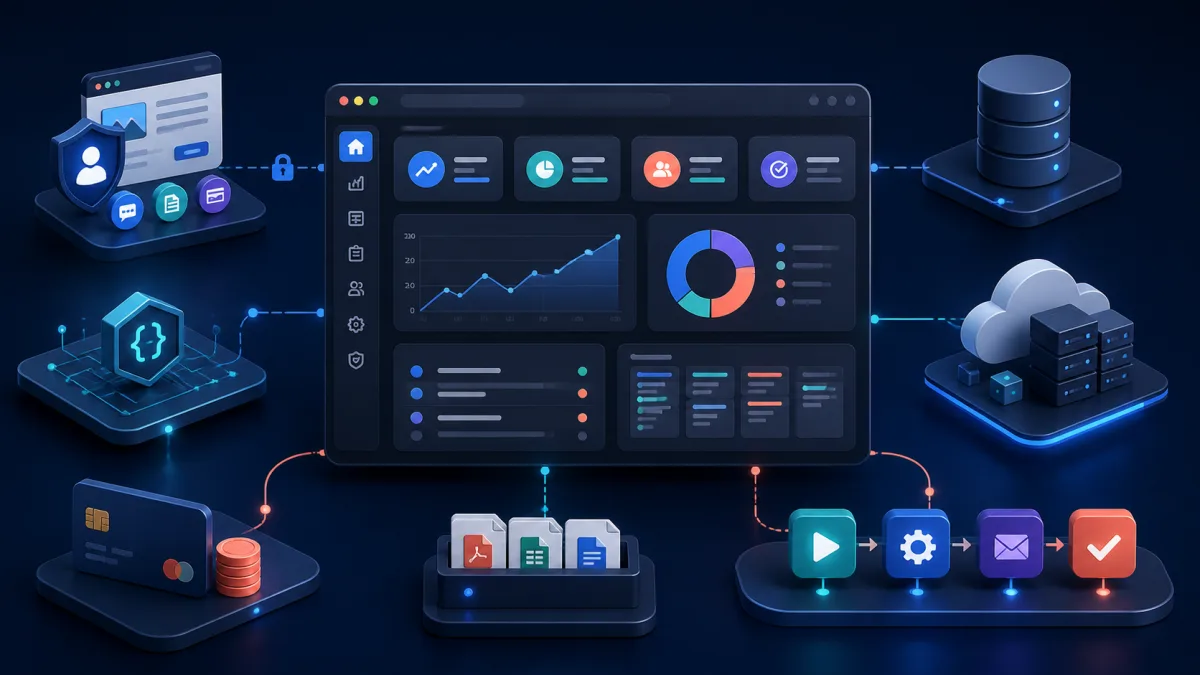
A traditional business website explains what a company does. It publishes service pages, earns search traffic, collects inquiries, and gives customers a way to make contact. Those jobs matter, but growing businesses often reach a point where presenting information is no longer enough. The website needs to participate in the operation.
Customers may need secure logins. Employees may need dashboards, approval queues, and reports. Orders must move between systems, documents need processing, and account data must stay synchronized with a CRM or accounting platform. A product may require subscription billing, an API, or SaaS functionality. Proprietary workflows that once lived in email and spreadsheets become too important to manage informally.
This is where custom web application development begins: the website becomes business software. The goal is not to add complexity for its own sake. It is to give people a dependable system that performs useful work, protects data, and fits how the business actually operates.
What Is Custom Web Application Development?
Custom web application development is the process of designing and building browser-based software around the requirements of a particular business. Unlike a generic product designed for thousands of companies, a custom application models the organization’s users, data, rules, exceptions, integrations, and goals.
The result might be a customer portal, employee dashboard, SaaS platform, inventory system, scheduling application, order-management tool, subscription service, vendor portal, reporting dashboard, or workflow automation system. It can support ecommerce, CRM integrations, APIs, document management, or practical AI-powered tools. One application may combine several of these capabilities.
A marketing website primarily presents information. A web application does work.
“Custom” does not mean every component must be invented. Responsible teams use proven frameworks, database engines, payment services, cloud infrastructure, and third-party APIs. The custom work is the combination: the business rules and operating experience that generic software cannot provide cleanly.
Website vs. Web Application
A traditional website commonly contains service pages, blog articles, company information, landing pages, and contact forms. Most visitors receive substantially the same content. Publishing, discoverability, accessibility, and conversion are central concerns.
A custom web application adds state and behavior. It may include authentication, user roles, permissions, customer-specific records, business workflows, database transactions, file processing, payments, APIs, automated notifications, reporting, and third-party integrations. Users take actions that change data, and the system must decide whether each action is valid and permitted.
The boundary is not absolute. A modern platform often combines a public marketing site with an authenticated application. A prospect can read an article, create an account, submit a request, upload a document, pay an invoice, and follow its status without leaving the same product. The public and private areas serve different purposes even when they share a domain and design system.
If you are comparing framework-specific approaches, the guide to Laravel web design versus web application development explores that distinction in more detail.
Signs Your Business Has Outgrown a Traditional Website
The clearest signs usually appear in operations rather than marketing. Look for repeated coordination, unclear ownership, unreliable data, and employees acting as human connections between systems.
Employees Are Copying Data Between Systems
An employee receives a request by email, enters it into a CRM, copies details into project software, creates an invoice, and updates a spreadsheet. Each step may seem small, but the complete process consumes time and creates opportunities for omissions, formatting differences, and stale records.
APIs and workflow automation can move verified data between systems without removing appropriate human decisions. The application can validate the request, create connected records, and flag exceptions for review. People spend less time copying values and more time handling the cases that require judgment.
Spreadsheets Have Become Business-Critical
Spreadsheets are excellent analysis tools. Problems arise when one workbook gradually becomes the unofficial customer database, scheduling system, approval process, and reporting application. Formulas encode undocumented business rules. Copies circulate through email. Nobody knows which version is authoritative, and one accidental edit can affect an entire operation.
A proper application can introduce authentication, role-based permissions, validation, audit history, controlled data access, backups, and consistent reporting. It can preserve useful exports to spreadsheets while moving the authoritative workflow into a governed system. The objective is not to ban spreadsheets; it is to stop asking them to perform jobs they were not designed to own.
Customers Constantly Ask Employees for Information
Repeated questions about order status, invoices, appointments, project progress, account updates, or documents often reveal an information-access problem. Employees become a manual query interface, looking up data and sending the same types of responses all day.
A customer portal can make appropriate information self-service. It can display current status, provide invoices and files, accept updates, and preserve a communication history. Employees remain available for exceptions and relationships, while routine visibility no longer depends on a phone call or email reply.
Existing Software Does Not Match the Business Workflow
Generic SaaS software is often the correct starting point, but businesses sometimes build extensive workarounds because the product’s workflow conflicts with reality. Staff create side spreadsheets, duplicate statuses, forward approval emails, or use free-text fields to represent data the system cannot model.
A custom application can own the differentiating workflow while leaving commodity functions in established products. That is frequently better than replacing everything. The custom layer coordinates the business-specific process and connects accounting, CRM, payments, storage, and communication tools through their APIs.
What Can a Custom Web Application Automate?
Consider a customer request that currently requires an employee to review the submission, enter the customer into another system, create a project, send confirmation, notify a coworker, generate an invoice, schedule a follow-up, and update a spreadsheet. Those eight actions cross several systems, and partial failure can leave the records inconsistent.
A focused application can accept the request, validate required data, check for an existing customer, and route unusual cases for review. After approval, it can create the project and invoice through APIs, record the external identifiers, send confirmation from the verified result, assign the follow-up, and update an operational dashboard. If one external service fails, the system records what succeeded and gives staff a safe recovery path.
This does not eliminate employees. It removes repetitive administration and makes exceptions visible. People still evaluate unusual requests, communicate with customers, approve consequential decisions, and improve the process. The article on custom PHP development for business automation offers a deeper method for selecting and measuring a first automation project.
Why PHP and Laravel Work Well for Business Applications
Modern PHP is a mature server-side platform with strong tooling, a large ecosystem, predictable deployment options, and broad hosting support. It is well suited to data-driven applications that combine HTML interfaces, databases, APIs, background processing, and integrations.
Laravel provides an organized application foundation: routing, authentication, authorization, database access, validation, notifications, caching, APIs, testing, queues, scheduled jobs, and command-line processes. Teams can use the capabilities appropriate to the deployment rather than assembling every concern from unrelated libraries. Developers spend more time on the company’s unique rules and less time reinventing standard application plumbing.
The framework is only part of the answer. Data modeling, permission boundaries, integration behavior, testing, deployment, monitoring, and recovery still require engineering judgment. For a framework-focused treatment, see the Laravel application development guide and CPD’s practical Laravel application development services.
Customer Portals
A customer portal can let customers review orders, upload documents, download invoices, manage subscriptions, view project status, schedule appointments, update account details, communicate with staff, review reports, and make payments. A useful portal is not merely an internal screen exposed to the internet. It is designed around the customer’s tasks and the precise data that account may access.
Authentication answers, “Who is this user?” Authorization answers, “May this user view or change this specific record?” A logged-in customer must not gain access to another account by changing an identifier in a URL or request. Strong applications enforce authorization on the server for every sensitive operation, scope database queries appropriately, validate file access, and test these boundaries.
Portals also need operational clarity. Status labels should correspond to real business states. An uploaded file should have ownership, retention, and scanning rules. Payment results should be verified with the processor. Notifications should describe completed state changes, not promise work that failed halfway through.
Internal Business Applications
Internal applications can support sales, operations, inventory, customer service, accounting workflows, approvals, project management, reporting, and document processing. Their value comes from placing the right information and next action in front of each role while preserving a reliable record of what happened.
Custom software does not need to replace the CRM, accounting platform, cloud storage, and email provider. Often it should act as the workflow and integration layer connecting them. The CRM remains responsible for sales activity, the accounting system remains the financial system of record, and the custom application coordinates the proprietary process between them.
This architecture limits unnecessary scope and respects systems that already work. It also requires clear ownership: the team must decide which system is authoritative for each field, how conflicts are resolved, and what happens when an integration is unavailable.
API Integrations Need Failure-Aware Engineering
Business applications commonly integrate payment processors, CRMs, accounting systems, shipping providers, email platforms, social platforms, cloud storage, ecommerce systems, mapping services, AI APIs, and proprietary vendor services. A successful demonstration is only the beginning. Production integrations operate across networks and organizations the application does not control.
OAuth tokens expire. Rate limits change. Requests time out after the remote service completed the operation. APIs change fields or authentication requirements. Webhooks arrive twice or out of order. A provider can be unavailable while the rest of the application remains healthy.
Resilient integration code uses explicit timeouts, structured logging, safe retries, idempotency keys, webhook signature validation, database transactions, and reconciliation tools. Where the operating environment supports them, Laravel queues and scheduled jobs can move slow work away from user requests and revisit incomplete records. In other deployments, application-triggered processes or provider webhooks can provide the same separation without persistent workers. Monitoring should reveal stuck or repeatedly failing work before a customer reports it.
An integration needs a recovery interface as much as it needs a success path. Staff should be able to see which step failed, retry an idempotent operation, or correct invalid data without manually editing a production database.
Adding AI to Custom Business Applications
AI is most useful when attached to a well-defined workflow. Practical capabilities include document summarization, request classification, structured data extraction, draft responses, internal knowledge search, support analysis, employee assistance, content generation, and anomaly identification.
For example, a document-processing application can extract proposed fields and show the source passage beside each value. An employee reviews uncertain results before the application commits them. The AI reduces transcription work; it does not silently become the system of record.
Traditional application engineering remains essential. Authentication identifies the user, authorization protects each record, the database preserves approved state, validation constrains inputs, logging supports investigation, cost controls limit usage, and human review handles consequential or uncertain outputs. AI is one application capability, not a substitute for the application.
Custom Web Applications and SaaS
SaaS products are specialized web applications offered to multiple customer organizations. Beyond the core feature, a SaaS platform may need tenant isolation, subscription billing, usage limits, plan management, onboarding, account administration, roles, API access, background processing, notifications, analytics, and audit history.
Tenant isolation deserves particular attention. Every query, file, cache entry, background task, and export must preserve the correct organizational boundary. Billing events must be idempotent and reconcilable. Plan restrictions should be enforced in the application rather than only hidden in the interface.
Laravel can be a strong SaaS foundation because it supplies consistent patterns for web requests, data, authorization, events, notifications, APIs, tests, and operational commands. CPD’s guide to building SaaS applications with AI capabilities examines product scope and production ownership further.
Modernizing Existing PHP Applications
Many businesses already own PHP applications containing years of valuable business logic. The interface may look dated or the code may be difficult to change, but the software still encodes pricing, eligibility, fulfillment, reporting, and exception rules that the organization depends on.
Risks accumulate when an application runs on an old PHP version, relies on unsupported dependencies, has security gaps, uses manual deployments, lacks automated tests, performs poorly, or depends on fragile infrastructure. Those risks need attention, but they do not automatically justify a complete rewrite.
Incremental modernization begins with an inventory of behavior, dependencies, data, integrations, and operational risk. Teams can add characterization tests around critical paths, upgrade compatible components, isolate external services, improve deployment, and move suitable modules into Laravel behind stable boundaries. Working business logic remains available while risk decreases in stages.
The right sequence depends on the application. Read CPD’s legacy PHP application modernization guide or review legacy modernization services for a preservation-first approach.
What Makes a Web Application Production-Ready?
Writing application code is only one part of delivery. Production engineering asks what happens when the database is unavailable, an API fails, a deployment introduces a defect, storage fills, or a credential is exposed. It defines how access is controlled, secrets are managed, backups are verified, errors are detected, security updates are applied, and performance is monitored.
Depending on the requirements, the supporting system may use AWS, Docker, CI/CD pipelines, managed databases, object storage, caching, centralized logging, automated backups, monitoring, and Infrastructure as Code. These tools help create repeatable environments, controlled releases, observable failures, and practical recovery. They are not a checklist to impose on every small project.
A straightforward application may need one well-managed runtime, a database, object storage, encrypted backups, basic monitoring, and a repeatable deployment process. A high-volume, regulated, or globally distributed platform may require stronger isolation and redundancy. The correct architecture is the simplest architecture that reliably satisfies the application’s actual requirements.
That architecture must include rollback and restoration, not only deployment. A backup has limited value until restoration is tested. A CI/CD pipeline should prevent known-bad changes from progressing and preserve a way to return to a working release. Explore the AWS DevOps and CI/CD guide for the operational layer.
How Much Does Custom Web Application Development Cost?
A responsible estimate follows discovery because cost depends on what the system must do and what can go wrong. Major drivers include workflow complexity, the data model, integrations, roles and permissions, interface requirements, legacy systems, data migration, compliance, infrastructure, testing, reporting, AI functionality, and long-term maintenance. See our detailed breakdown of custom PHP development cost factors when preparing a budget.
A single-role internal workflow connected to one reliable API is different from a multi-tenant product with payments, complex permissions, historical migration, customer-facing interfaces, and several vendor systems. Two applications with the same number of screens can have very different risk.
Discovery should identify users, goals, authoritative data, business rules, exceptions, integrations, security needs, production expectations, and a valuable first release. It turns an idea into boundaries that can be estimated and tested. Fixed prices invented before that work tend to hide assumptions rather than remove uncertainty.
Should You Build Custom Software?
Custom development is not always the correct answer. If an established SaaS platform solves roughly 90% of the requirements at a reasonable cost, using it may make better business sense. The company gains faster implementation, shared maintenance, and a product already tested by many customers.
Custom software becomes more attractive when limitations materially affect revenue, customer experience, operational efficiency, proprietary processes, competitive differentiation, integrations, data ownership, or scalability. Even then, integration or a focused custom layer may deliver more value than replacing every existing system.
The question is not whether custom software can be built. Almost anything can be built. The better question is whether owning the software creates enough business value to justify building and maintaining it.
Ownership includes source code, infrastructure, security updates, vendor changes, support, monitoring, and continued improvement. A useful business case compares those obligations with measurable operating cost, risk reduction, new capability, and strategic value.
Choosing a Custom Web Application Development Company
Portfolio screenshots show visual quality, but they reveal little about production ownership. Evaluate how a company approaches application architecture, PHP and Laravel, database design, authentication, authorization, API integrations, automated testing, security, CI/CD, cloud infrastructure, monitoring, backups, deployment, rollbacks, documentation, and long-term maintenance.
Ask for specific explanations rather than tool lists:
- Who owns the source code, accounts, domains, and infrastructure?
- How are production failures detected and diagnosed?
- What is tested before a release, and what is the deployment process?
- How is a failed deployment rolled back?
- How are backups restored and verified?
- Can another qualified developer maintain the application later?
A credible custom web application development company should also be willing to recommend an existing product when building would not create enough value. The discovery process should reduce uncertainty, identify a smallest useful release, and make ownership explicit.
Custom Web Application Development With Custom PHP Design
Custom PHP Design builds and modernizes PHP and Laravel applications, including customer portals, internal business applications, SaaS platforms, workflow automation, APIs, third-party integrations, AI integrations, legacy PHP modernization, AWS infrastructure, CI/CD, and production support.
Our approach is practical: understand the business problem and build the smallest durable system that solves it. That may mean a focused Laravel application, an integration layer around existing SaaS products, or an incremental modernization plan for software that already contains valuable logic.
AI-assisted development can accelerate analysis, implementation, tests, and documentation when used carefully. Architecture, security, validation, production deployment, and operational ownership still require experienced engineering judgment. If your company is dealing with spreadsheets, disconnected SaaS products, repetitive manual processes, or an aging PHP application, contact Custom PHP Design to discuss the workflow.
Frequently Asked Questions
What is a custom web application?
A custom web application is browser-based software designed around a business’s specific users, data, rules, and workflows. Customer portals, internal operations systems, SaaS products, and integration platforms are common examples.
What is the difference between a website and a web application?
A website primarily publishes information. A web application accepts input, applies business rules, changes stored data, controls access, connects systems, and completes operational work. Many modern products contain both a public website and authenticated application.
Is Laravel good for custom web application development?
Yes. Laravel provides established tools for routing, authentication, authorization, databases, validation, notifications, APIs, testing, caching, and operational processes. That foundation lets developers concentrate on the business-specific behavior.
Can an existing PHP application be converted to Laravel?
Often, but conversion does not require a complete rewrite. A team can assess the application, protect critical behavior with tests, improve risky dependencies, and move suitable modules into Laravel incrementally while preserving working business logic.
Can a custom application integrate with existing business software?
Yes. It can connect CRMs, accounting software, payments, shipping, cloud storage, email, ecommerce, AI services, and proprietary vendor APIs. The custom application can coordinate the unique workflow while established products remain systems of record.
How long does custom web application development take?
The timeline depends on workflow and data complexity, integrations, migration, permissions, interface requirements, testing, and production readiness. A focused first release may be delivered in stages, but discovery is necessary before making a responsible estimate.
Do small businesses need custom web applications?
Some do, but not all. Custom software can make sense when recurring manual work, disconnected tools, customer-service demands, or a proprietary process creates enough measurable cost or opportunity. An existing SaaS product is better when it solves the need economically.