Adding ChatGPT to a Laravel product can mean two very different things. The first is sending a prompt to a language model and displaying generated text. The second is allowing a custom GPT to work securely with the accounts, permissions, records, and business processes that already exist inside a production Laravel application.
GPT Actions address the second problem. They let a custom GPT call an external API described by an OpenAPI document. Once authentication and authorization are in place, a person can ask the GPT to retrieve account information, query application data, create a record, schedule an action, publish approved content, start a workflow, or produce a report without navigating every screen manually.
The API call is the easy-looking part. The production challenge is proving which customer authorized the call, limiting what the GPT can do, preserving isolation between accounts, and fitting the integration into an existing application without disrupting current API consumers.
This guide explains an architecture we used while connecting ChatGPT GPT Actions to Laravel through Laravel Passport, OAuth 2.0 Authorization Code flow, refresh tokens, an OpenAPI contract, a separate authentication application, RS256-signed account handoffs, and token introspection. The details are generalized so no customer information, credentials, keys, or internal infrastructure are exposed.
What GPT Actions Are—and What They Are Not
A GPT Action is an API capability attached to a custom GPT. The builder supplies an OpenAPI specification that describes available endpoints, inputs, outputs, and authentication. During a conversation, ChatGPT can decide that an operation is relevant, collect or infer the required arguments, obtain confirmation where appropriate, and send a request to the external application.
That is different from ordinary content generation. If a Laravel application sends a prompt such as “summarize this support ticket,” the model receives supplied text and returns generated content. It does not automatically know which customer is signed in, which records that customer owns, or whether the customer can update them.
A GPT Action crosses that boundary. It can ask an existing application for current data or request a controlled state change. That capability makes API design and authorization more important, not less. The model is a new API client; it should not become a shortcut around the policies already protecting the application.
Useful action designs include:
- Returning the authenticated customer's account summary
- Searching orders, projects, posts, or support cases the customer may access
- Creating a draft while requiring a person to approve publication
- Starting an import, analysis, or report-generation workflow
- Scheduling an application-owned operation
- Retrieving metrics through an analytics scope
If your Laravel product already exposes a disciplined API, GPT Actions may require less architectural work than expected. The important step is reviewing whether that API has stable contracts, user-scoped queries, appropriate write protections, and an authentication method suitable for ChatGPT. Custom PHP Design can evaluate an existing Laravel application and map a practical GPT Action integration.
A Production Architecture for Laravel GPT Actions
The conceptual request path is straightforward:
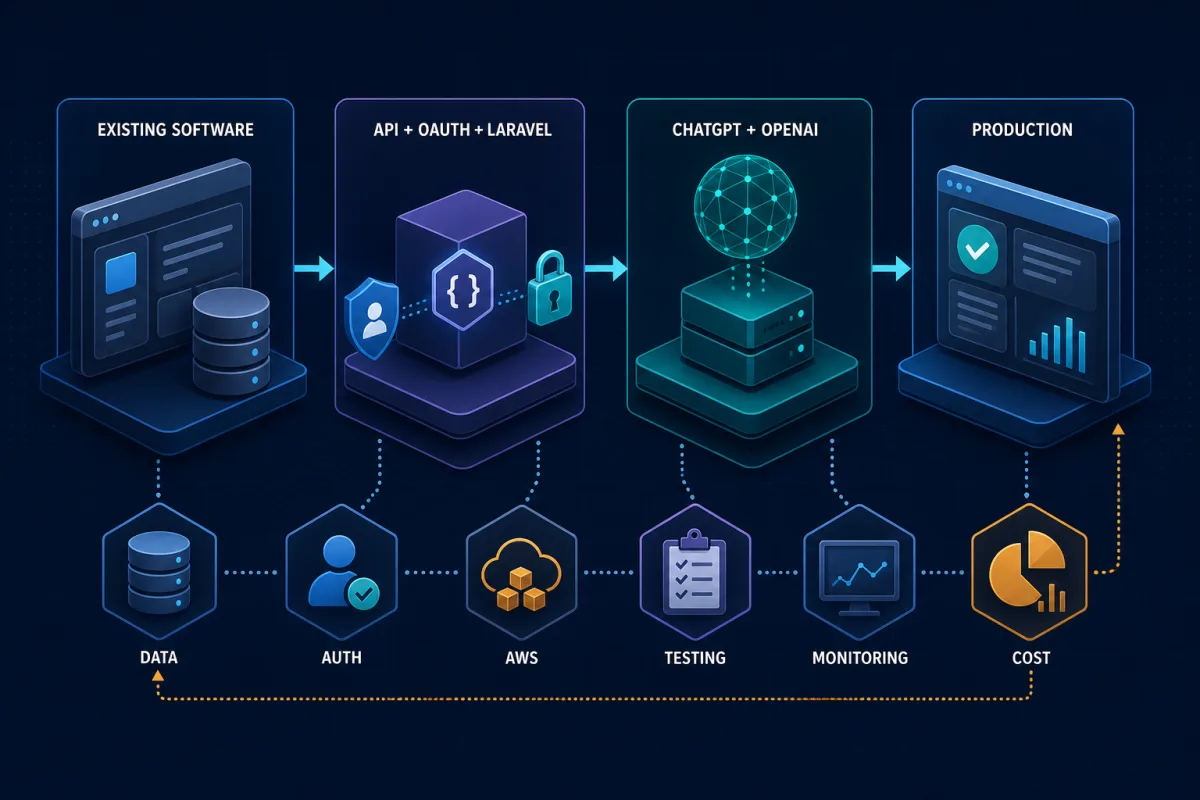
ChatGPT → GPT Action → OAuth 2.0 → Laravel Auth Service → Laravel Application API → Existing Business Logic → Customer Data
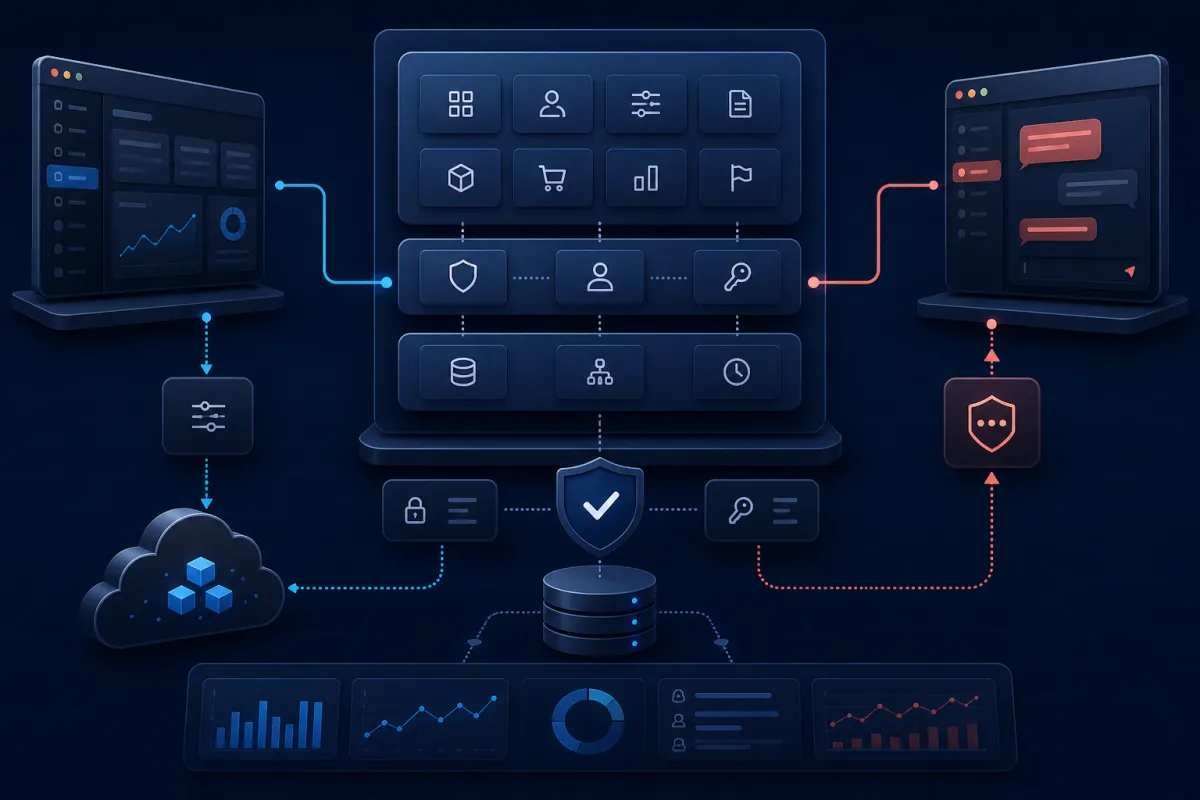
The GPT Action owns the conversational interface and knows the API contract. OAuth establishes delegated authority for a particular person. The authentication service issues and validates credentials. The primary Laravel application resolves that identity, checks scopes and application policies, then calls the same service layer used by its existing web or API interfaces.
Companies do not necessarily need to rewrite an established Laravel application to support this path. In a well-factored system, controllers remain adapters. The GPT-facing controller validates the request and delegates to existing actions or services. Policies, tenant boundaries, validation rules, and business invariants stay authoritative.
This additive approach protects prior investments. A mature SaaS application may already have mobile clients, partner integrations, internal dashboards, API keys, or webhooks. GPT support should become another controlled entry point rather than a replacement platform. For broader architectural help, see our custom Laravel application development services and guide to adding AI features to an existing PHP application.
Use OpenAPI as a Contract, Not Decoration
GPT Actions use OpenAPI to understand which operations are available and how to call them. A minimal read operation might begin like this:
openapi: 3.1.0

info:
  title: Example Laravel API
  version: 1.0.0

servers:
  - url: https://example.com

paths:
  /api/v1/account:
    get:
      operationId: getAccount
      summary: Get information for the authenticated account
      responses:
        "200":
          description: The authenticated account summary
A schema that merely passes validation is not necessarily a good action schema. The model uses names and descriptions to decide which operation matches a request. A specific operationId such as getAccount is more useful than accountOperation. A summary should distinguish reading a current account from searching all accounts or updating settings.
Descriptions should explain important behavioral constraints: whether a date is interpreted in the customer's timezone, whether an operation creates a draft or publishes immediately, and whether an omitted filter broadens or narrows the result. Request schemas should mark required values accurately, constrain enums, describe formats, and avoid accepting arbitrary objects when the domain has a stable shape.
Response schemas matter for the same reason. A predictable response helps the GPT identify the useful fields and explain an outcome accurately. Error responses should distinguish authentication failure, insufficient scope, validation failure, missing resources, rate limiting, and an internal failure. Do not return stack traces or internal identifiers simply because an AI client is consuming the API.
Start with a small set of high-value operations. Broad, overlapping tools make action selection harder and increase the authorization surface. One precise read endpoint and one carefully controlled write endpoint are often a better first release than exposing an application's entire API.
OAuth 2.0 for User-Specific Laravel Data
An unauthenticated action may be sufficient for a public catalog or status endpoint. User-specific SaaS data requires authentication. ChatGPT needs delegated access that belongs to the person linking an account, expires appropriately, and can be revoked without changing that person's password.
Laravel Passport can provide an OAuth 2.0 Authorization Code flow. Conceptually, the sequence includes:
- ChatGPT sends the person to the configured authorization endpoint.
- The authorization request identifies the OAuth client, redirect URI, and requested scopes.
- The person authenticates and approves access.
- The authorization service redirects to the exact registered callback with a short-lived authorization code.
- ChatGPT exchanges that code at the token endpoint using the client credentials and redirect URI.
- The service returns an access token and, when configured, a refresh token.
- ChatGPT presents the access token as a bearer token when invoking an action.
The client ID identifies the integration; it is not a secret. The client secret authenticates the confidential client and must never appear in browser output, source control, support screenshots, or logs. The redirect URI should be an exact registered value rather than a permissive pattern. Authorization codes should be short-lived and single-use. Access tokens should have a deliberate lifetime, and refresh tokens require the same care as other long-lived credentials.
OAuth answers “what delegated authority accompanies this request?” The Laravel application still has to answer “may this person perform this operation on this record?” A valid token cannot replace policies, tenant filters, ownership checks, or domain validation.
Design OAuth Scopes Around Capabilities
Scopes let the authorization server constrain what an access token represents. A GPT that only reports account status should not receive publishing authority. Practical scopes might include:
profilefor basic identity informationaccount.readfor account settings or statusposts.readfor retrieving the customer's contentposts.writefor creating or updating permitted contentanalytics.readfor reporting data
Scopes should be narrow enough to communicate meaningful authority but not so granular that consent and maintenance become incomprehensible. Read and write access should normally be separate. Destructive operations deserve stronger scrutiny and may be inappropriate for an initial action release.
Scope enforcement belongs close to the API boundary and should remain visible in tests. It is not enough to list scopes on the OAuth consent screen. Every protected endpoint must verify the required scope, and application authorization must still restrict the resulting query or command to the canonical user.
When OAuth and the Main SaaS Live in Two Laravel Codebases
Some organizations operate authentication separately from the primary product. That separation may exist for reuse across products, security boundaries, organizational ownership, or gradual modernization.
In the architecture behind this guide:
- Application A was the main Laravel SaaS application. It owned customers, application data, business rules, and GPT-facing API endpoints.
- Application B was a Laravel OAuth and authentication service. It owned Passport OAuth clients, access tokens, refresh tokens, and the authorization experience.
This creates an identity-mapping problem. Passport can correctly identify a user in the authentication database, but the application API needs the corresponding customer identity in a different database. Matching an email address on every request is brittle. Sharing primary keys assumes two independent databases will remain synchronized. Letting the API accept a user ID from a query parameter is an authorization vulnerability.
The integration needs an explicit, auditable relationship between the authentication identity and the main application's user. We can describe it as:
Auth User → Account Link → Main Application User
The link should be created only after the person has proven control of the main application account through a trusted flow. Once established, token introspection can return the canonical linked identity without exposing database internals to ChatGPT.
Secure Account Linking Without Trusting a User ID
A URL such as ?user_id=123 proves nothing. Any caller can change 123 to another value. Encrypting or base64-encoding the parameter does not solve the trust problem unless the receiver can verify who issued it, what it is intended for, and whether it is still valid.
A stronger handoff begins inside the main application, after its normal authentication has established the customer. The main application creates a short-lived signed assertion for the authentication service. The user follows that handoff, the authentication service verifies it, and only then does it create or update the account link.
The browser transports the assertion, but it cannot alter the signed claims. The assertion is not an OAuth access token and should not grant direct API access. It has one purpose: allowing a trusted application to attest, for a few moments, that a specific canonical account completed the handoff.
This also improves user experience. Customers should sign in through the product they already recognize. They should not have to understand that an internal OAuth identity, a separate Passport database, or an account-link record exists. The authentication application can resolve or provision its internal user after validating the trusted handoff.
Using an RS256-Signed Account Handoff
RS256 uses asymmetric cryptography. The main application keeps a private key and signs the assertion. The authentication service receives only the public key and verifies the signature. A compromise of the verifier does not give it the ability to create new assertions.
A compact handoff can include standard claims:
iss: the trusted application that issued the assertionsub: the canonical main-application user identifieraud: the authentication service intended to consume itiat: when it was issuedexp: a near-term expirationjti: a unique identifier for this one handoff
Signature verification is only the first check. The authentication service should allow the expected algorithm explicitly, select an approved key by key ID, verify the issuer and audience, reject future or expired timestamps outside a small clock-skew allowance, require a valid subject, and ensure the jti has not already been consumed.
Replay protection matters because a valid assertion copied from browser history or a proxy log would otherwise remain usable until expiration. Store a one-way representation of the JTI with an expiry and reject duplicates atomically. Keep the token lifetime short, use HTTPS throughout, and avoid placing sensitive profile data inside the assertion. Signed content is integrity-protected, not automatically encrypted.
Token Introspection Across the Two Applications
When ChatGPT calls the main API, it supplies an OAuth bearer token issued by the authentication application. The main application needs to validate that token and resolve the linked canonical user.
A server-to-server introspection flow keeps ownership clear:
ChatGPT → Bearer Token → Main Laravel API → Auth Token Introspection → Canonical Laravel User → Scope Check → Controller / Service
The main API sends the presented token to a protected introspection endpoint using its own server-to-server credentials. The authentication service checks Passport's token state, expiry, revocation, client, user, and scopes. It then returns the minimum result needed by the main application: whether the token is active, its permitted scopes, and the linked canonical identity.
The application must authenticate the introspection request itself. Otherwise an attacker could use the endpoint to probe tokens or account relationships. Restrict the endpoint at the application and network levels where practical, use a dedicated credential with rotation, apply rate controls, and never include the original bearer token in diagnostic output.
Directly sharing Passport's database between the applications looks faster at first, but it couples the main product to Passport tables, migrations, token hashing behavior, and the auth application's database availability. A versioned introspection contract lets the authentication service remain responsible for its own storage while the product consumes a stable security boundary.
Keep Existing API Keys While Adding OAuth Bearer Tokens
An established application may already serve integrations authenticated by API key. Supporting GPT Actions should not force every existing client to migrate immediately.
Laravel middleware can support both mechanisms additively. One authenticator recognizes a bearer token, performs introspection, resolves the canonical user, and attaches an authenticated principal with scopes. Another validates the existing API key and creates the principal expected by legacy API consumers. Downstream authorization uses a consistent request identity rather than repeating credential parsing in each controller.
The two paths should not silently grant identical capabilities. Document which routes accept which authentication methods, preserve existing API-key behavior, and require OAuth scopes for GPT-specific operations. Emit consistent 401 responses for invalid credentials and 403 responses for authenticated callers lacking authority.
This middleware boundary lets teams modernize incrementally. It reflects the same risk-managed approach we use for legacy application modernization and custom PHP application development: preserve working integrations while introducing a cleaner path for new clients.
Authentication UX Should Hide Internal Identity Plumbing
The internal OAuth user is an implementation detail. The customer cares about connecting the account they already use. A confusing second registration screen creates support problems and increases the chance that the wrong identities are linked.
A better sequence returns the customer to the familiar SaaS login when needed, explains the permissions ChatGPT is requesting, performs the signed handoff behind a clear confirmation step, and resumes OAuth authorization. If an internal auth user does not exist, the service can provision one from verified claims after the handoff. If a link already exists, the flow should confirm it rather than create duplicates.
Account switching needs explicit treatment. A person signed into one ChatGPT account and a different browser session may otherwise authorize an unintended customer. Display enough non-sensitive context for the person to recognize the account, allow cancellation, and test unlinking and relinking as carefully as first-time connection.
Production OAuth Debugging Lessons
OAuth failures often surface far from their cause. A generic ChatGPT connection error may originate in the authorization redirect, token exchange, introspection request, account link, middleware, scope check, or application controller. Debug the chain one boundary at a time.
Separate 401 Responses From 500 Responses
A 401 should mean credentials are missing, invalid, expired, or revoked. A 403 should mean a valid identity lacks scope or application permission. A 500 indicates the server could not complete a valid request. Converting every exception into 401 hides configuration, database, networking, and code failures behind a misleading authentication message.
Verify Redirects and Client Configuration Exactly
OAuth redirect mismatches are frequently character-level problems: scheme, host, path, trailing slash, or environment-specific configuration. Compare the redirect received by Passport with the registered value. Confirm the correct OAuth client is being used in the correct environment.
Also confirm how the installed Passport version stores and validates client secrets. A copied value can be wrong, truncated, associated with another client, or misunderstood because secret hashing behavior differs from an older setup. Diagnose configuration without printing the secret.
Trace Server-to-Server Authentication
An introspection request can fail before it evaluates the user's token. Confirm the main application sends its own required authentication headers, the auth service recognizes the caller, HTTPS terminates as expected, and proxies preserve the authorization headers. Then check whether the bearer token is active and whether the returned subject has an account link.
Check Scopes and Account Links Independently
A token can be valid while lacking posts.write. It can have the correct scope while its OAuth user lacks a main-application link. Log these as different decisions. That distinction turns “OAuth is broken” into a specific repairable condition.
Remember Laravel's Runtime Configuration
A correct .env edit does not affect an application still using stale cached configuration. Confirm the deployed config values through safe application diagnostics, rebuild Laravel's configuration cache during the approved deployment process, and verify writable cache directories. Passport private and public keys must exist at the configured paths with ownership and permissions that allow the application process—but not unrelated users—to read them.
Log Decisions, Never Credentials
Useful diagnostic fields include a correlation ID, request path, OAuth client identifier, expected issuer, key ID, token-active boolean, requested and required scope names, canonical user reference, HTTP status, upstream duration, and a sanitized error category.
Never log access tokens, refresh tokens, client secrets, private keys, authorization codes, or signed identity handoffs. Avoid full request headers and unfiltered exception context. Redaction must happen before data reaches centralized logging, because deleting a credential from one application log does not remove it from every copied destination.
Deployment Considerations for Passport and GPT Actions
Production success depends on configuration as much as code. Define OAuth endpoints, client settings, audiences, issuers, introspection credentials, allowed key IDs, and timeouts through Laravel configuration. Read environment variables from config files rather than throughout application code so configuration caching behaves predictably.
Deployment scripts should validate required configuration without revealing values. They should apply approved, backward-compatible database migrations, build the configuration cache at the correct stage, confirm Passport keys are present, verify filesystem ownership and permissions, and perform a health check that exercises dependencies safely.
Use HTTPS for authorization, token exchange, callbacks, handoffs, introspection, and action endpoints. Store secrets and signing keys through the environment's secret-management system rather than repository files. Plan key rotation before it is urgent: support an active key ID, allow a controlled overlap while verifiers receive the new public key, and remove retired keys after old short-lived assertions can no longer validate.
Database migrations need ordering across two independently deployed applications. If an introspection response will add a field, deploy the consumer so it tolerates the field's absence before the provider begins sending it. Version contracts when a change cannot remain backward compatible.
For help operating these integrations after development, our AWS and Laravel DevOps work covers secure configuration, deployment pipelines, monitoring, and production troubleshooting.
Test the Entire GPT Action Chain
Unit tests for a controller or token parser are necessary but insufficient. The highest-risk defects occur between systems. Exercise the complete chain:
ChatGPT → OAuth authorize → Authorization code → Token exchange → API call → Introspection → Account resolution → Scope validation → Controller → Correct customer's data
Test a successful read, a permitted write, rejected scopes, expired and revoked tokens, reused handoffs, malformed claims, wrong issuers and audiences, missing account links, unavailable introspection, invalid server credentials, and safe error responses. Confirm refresh behavior without exposing the refresh token.
Most importantly, test with at least two real test users. Create distinguishable records for User A and User B. Link each account independently, authorize each GPT connection, and prove every list, detail, update, and workflow remains isolated. Then deliberately request User B's identifiers while authenticated as User A. A system that only succeeds for one happy-path account has not proven multi-tenant authorization.
Review the actual OpenAPI schema inside the GPT builder, not only through a generic API client. Confirm the GPT selects the intended operation, supplies valid inputs, handles empty results, explains authorization errors appropriately, and does not repeatedly invoke a state-changing action after an ambiguous timeout.
Current 2026 GPT Creation and Publishing Requirements
As of this article's August 2026 update, OpenAI's official guidance says personal ChatGPT accounts—including Free, Go, Plus, and Pro—cannot create or publish new GPTs. ChatGPT Pro remains a personal plan, so upgrading from Plus to Pro does not by itself provide the managed-workspace capability needed to create or publish a new GPT.
Business, Enterprise, and Edu are managed workspaces, but creation, sharing, and publishing still depend on workspace settings, role permissions, policy checks, and the available sharing option. Public GPT Store publishing may also require a valid privacy-policy URL and builder or domain verification.
Existing GPTs can remain usable and may still be editable when the account's current plan and permissions allow it. That can support development with an existing private GPT. New creation or customer/public distribution must follow the current managed-workspace requirements rather than assuming that any paid personal plan includes publishing.
Before planning rollout, review OpenAI's current official GPT sharing and publishing requirements. Treat the plan check as an early project dependency, not a discovery made after the OAuth and API work is complete.
How Custom PHP Design Can Help
Businesses still deciding where AI can help can begin with 10 ways to integrate ChatGPT into existing software. A reliable Laravel and ChatGPT integration crosses application architecture, identity, API contracts, OAuth security, user experience, testing, and production operations. It is not only an OpenAPI file and a token endpoint.
Explore our Laravel and ChatGPT integration services or talk to Custom PHP Design if you need help with:
- ChatGPT GPT Actions and custom GPT development
- OpenAPI design and GPT Action API development
- Laravel APIs and existing business logic integration
- Laravel Passport and OAuth 2.0 Authorization Code flows
- OAuth scopes, refresh tokens, and API authentication
- Secure account linking and RS256-signed identity handoffs
- Token introspection across separate Laravel applications
- User isolation and multi-tenant authorization testing
- AI integrations for established PHP and Laravel products
- Existing application modernization and AWS deployment
For companies building a new SaaS product around this capability, review our Laravel SaaS and MVP development services. For an established platform, we can begin with a focused architecture and security review, identify the smallest useful action set, and design an implementation that preserves current users and integrations.
Build the Integration Around Trust Boundaries
GPT Actions can make an existing Laravel application accessible through a useful conversational interface. The lasting engineering work is beneath that interface: a precise OpenAPI contract, a correctly implemented OAuth flow, limited scopes, verifiable identity mapping, secure introspection, familiar account-linking UX, and authorization that always returns the correct customer's data.
Keep the first action set narrow. Reuse established services and policies. Treat ChatGPT as a capable external API client, not as a trusted internal process. Instrument each boundary without recording credentials. Test the complete chain with multiple users. Verify current product and workspace requirements before committing to distribution.
When those foundations are explicit, GPT support can be added to a Laravel application without replacing the application that already runs the business. If ChatGPT will be called from inside Laravel instead of calling Laravel through a GPT Action, read our guide to integrating ChatGPT into an existing Laravel application. If the initiating direction is still unclear, use the GPT Actions vs OpenAI API decision guide before choosing the implementation path.
For implementation help across GPT Actions, OpenAPI, OAuth, Laravel/PHP APIs, data boundaries, and deployment, explore Custom PHP Design's ChatGPT integration services.