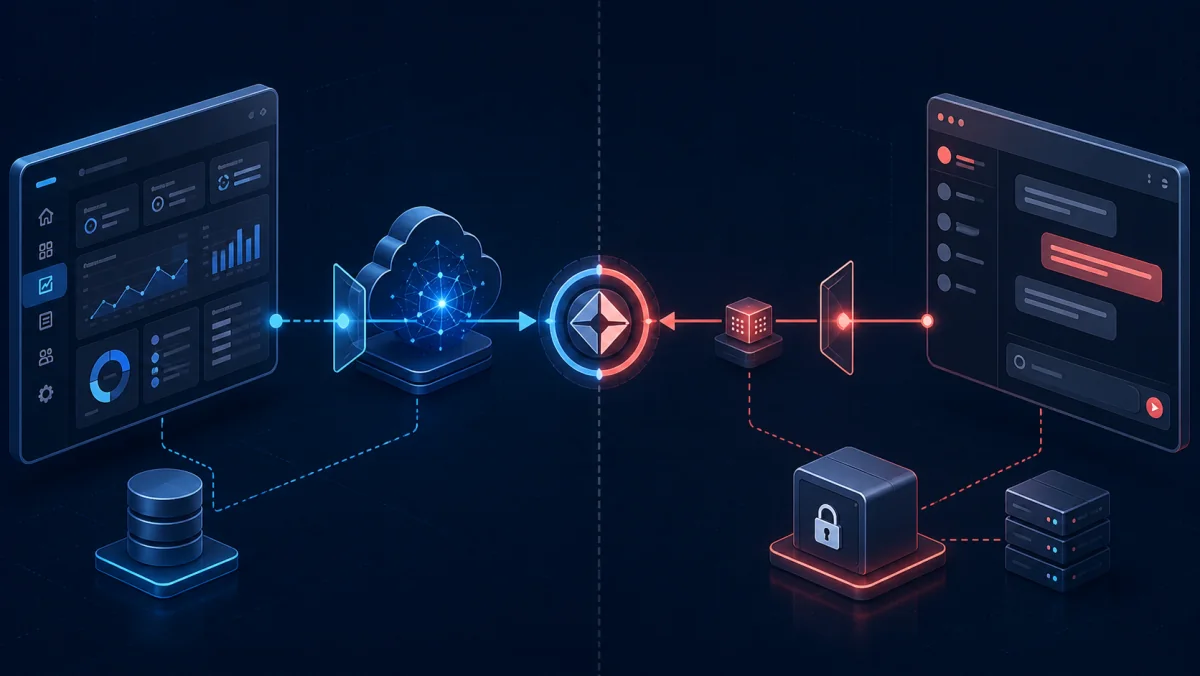
“Integrate ChatGPT with our application” can describe two architectures that move in opposite directions. In one, your application sends information to an OpenAI model and uses the response. In the other, a person works in ChatGPT and a custom GPT calls your application through a defined Action.
Projects become unnecessarily complicated when those directions are treated as interchangeable. A team may build public API endpoints and OAuth even though every user already works inside the Laravel application. Another team may build a new chat interface inside its SaaS product when the actual requirement is to let customers use selected product capabilities from a Custom GPT.
The useful first question is not which technology is more advanced. It is which side should initiate the workflow:
This decision guide explains when to use the OpenAI API, when to use GPT Actions, when a system may need both, and when neither is justified. If you need help applying the choice to an established system, Custom PHP Design provides ChatGPT integration services around Laravel, PHP, APIs, authentication, data boundaries, and production deployment.
What Is an OpenAI API Integration?
In an OpenAI API integration, your software initiates the interaction. A user clicks a control, submits a document, opens an AI-assisted search, or starts an application workflow. Laravel determines who made the request, which records are relevant, and what information the model is allowed to receive. The application then calls the provider, validates the response, and decides whether to display, store, or reject it.
The basic direction is:
Laravel Application
  → AI Service
    → OpenAI API
      → Response
        → Laravel Application
This is usually the natural architecture when AI is a feature inside an existing application. The interface remains yours. The user's session remains in Laravel. Existing policies, business services, database models, and workflows remain authoritative.
Common application-driven use cases include:
- summarizing account histories, support conversations, or reports;
- generating drafts for an employee or customer to review;
- classifying inbound requests into existing categories;
- extracting structured fields from documents;
- adding natural-language search to an application interface;
- assisting internal workflows with recommendations or explanations;
- processing batches of content or records outside an HTTP request; and
- adding an assistant panel to an established SaaS product.
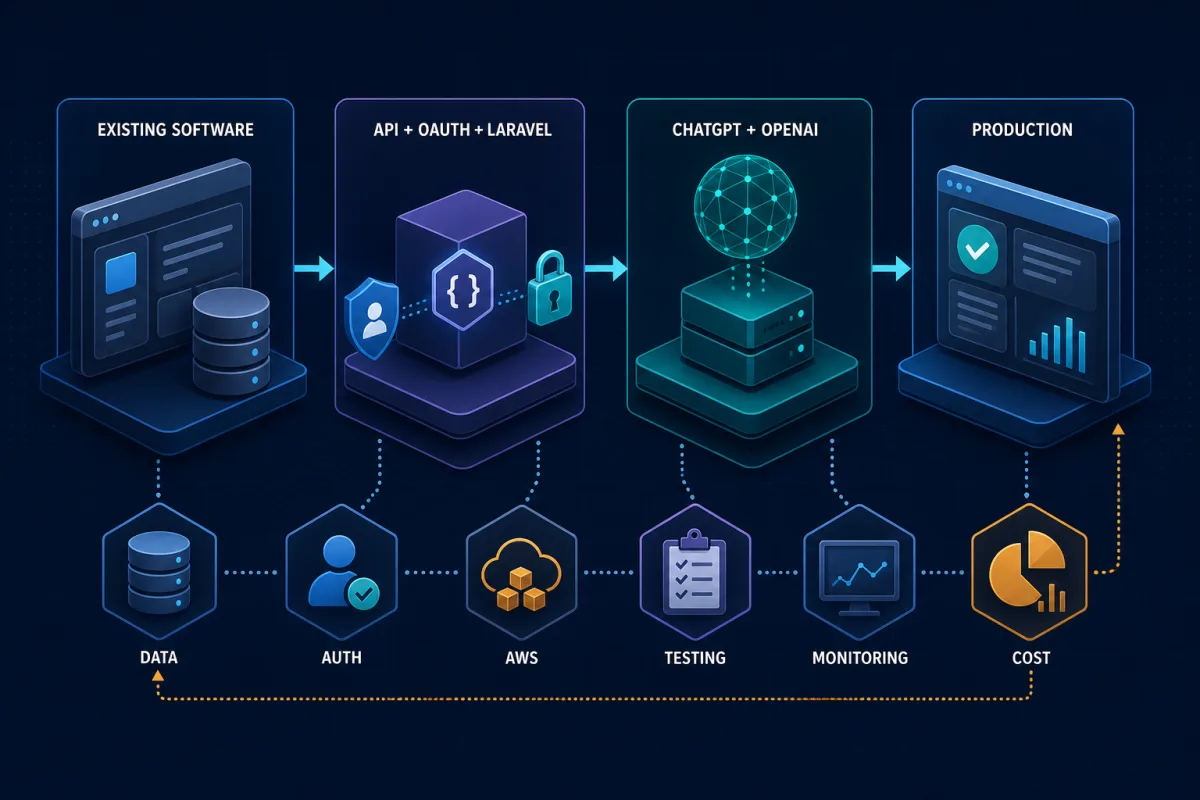
The application controls when the request happens, what context is supplied, which user is authorized, how much work is allowed, and what happens next. That control is why an API integration often fits existing software cleanly. Our architecture guide to integrating ChatGPT into an existing Laravel application covers service boundaries, existing databases, authorization, background processing, and production operation in greater detail.
What Are GPT Actions?
GPT Actions reverse the initiation direction. A person interacts with a Custom GPT in ChatGPT. Based on the conversation and the Action definitions available to it, the GPT selects an operation and calls an API exposed by your application.
The conceptual path is:
User
  → Custom GPT
    → OpenAPI-defined Action
      → Your Application API
        → Authorized Result
An Action can retrieve account information, look up an application record, create an authorized record, submit a structured request, trigger an existing workflow, or query an external business system. The GPT provides the conversational interface; your application API provides the controlled capability.
Actions require a precise API contract. An OpenAPI document tells the GPT which operations exist, what parameters they accept, and what responses they return. The application must still authenticate the caller where required, authorize every operation, validate input, constrain access, apply rate limits, and return errors the conversational interface can handle.
This article stays at the architecture and decision level. For implementation details—including OpenAPI, Laravel Passport, OAuth scopes, account linking, token introspection, and user isolation—read our guide to building GPT Actions with Laravel and OAuth.
The Simplest Way to Understand the Difference
Reduce the decision to two arrows:
OpenAI API
Your application → AI model
AI becomes a feature inside software you control.the workflow?
GPT Actions
Custom GPT → your application
ChatGPT becomes an interface to selected software capabilities.The direction changes several design decisions. It determines where the user interface lives, which system already knows the user's identity, where authorization runs, whether an external API is required, how errors are presented, and which side controls the next workflow step.
With an OpenAI API integration, Laravel normally owns the entire interaction. It can decide not to call the model, select a different model, move work into a supported background mechanism, ask for human approval, or fall back to a deterministic process.
With GPT Actions, the conversational interaction lives in ChatGPT. The GPT chooses from the operations you expose, but your application remains responsible for deciding whether each API request is authenticated, authorized, valid, and safe to execute. The GPT can request an action; it does not acquire authority over the application.
When You Should Use the OpenAI API
Start with an application-driven OpenAI integration when users already work inside your Laravel, PHP, SaaS, or internal business application and AI should improve that experience. There is usually no reason to move the primary interface into ChatGPT if the existing product already provides the navigation, records, context, and permissions users need.
The OpenAI API is a strong fit when:
- AI output appears in your existing application interface;
- Laravel initiates work after a user action or application event;
- your application needs to assemble context from several internal sources;
- long-running or batch work should run outside the web request;
- results must pass through application validation or human approval;
- the application needs to store operation state and associate it with records;
- you want complete control over model choice, prompts, budgets, and fallback behavior; or
- users should not need a separate ChatGPT workflow.
For example, a support platform may allow an authorized employee to open a case and request a summary. Laravel retrieves only the permitted case history, sends a bounded prompt, validates the response, and displays a draft. The employee never leaves the application, and the model never receives unrestricted access to the database.
This architecture is often easier to add incrementally because the application already has the identity, records, and workflow. The new work can sit behind a centralized service rather than requiring a new public integration surface.
When You Should Use GPT Actions
Evaluate GPT Actions when users primarily want to work in ChatGPT or a Custom GPT and need that conversational interface to retrieve live information or perform selected operations in your software.
GPT Actions are a strong fit when:
- a Custom GPT is the intended user interface;
- the GPT needs current data that is not contained in its instructions or uploaded knowledge;
- users need the GPT to create, update, or trigger approved application work;
- your business already has a suitable API or can expose a narrow integration API;
- external users can be authenticated and mapped safely to application accounts; and
- the desired workflow benefits from conversational discovery before an API operation.
Imagine a SaaS product with an API for viewing campaign status and starting an approved reporting workflow. A Custom GPT could help the user decide which report is needed, then call a narrowly scoped Action. The Laravel API would authenticate the account, check access to the campaign, validate report parameters, and invoke the same business service used by the normal application.
The quality of this architecture depends less on conversational polish than on the API boundary. Expose focused capabilities, not generic database operations. Return stable, compact responses. Require confirmation for consequential changes. Treat the GPT as an external API client rather than a trusted internal process.
When You Might Need Both
An application can use the OpenAI API internally while also exposing selected functionality through GPT Actions. These are not competing integrations when they serve different interfaces.
A Laravel SaaS product might use an OpenAI model to summarize account activity, classify uploaded documents, and generate report narratives inside its dashboard. At the same time, a Custom GPT could let an authenticated customer ask for current campaign status or start an approved report without opening the dashboard.
Application interface
  → Laravel AI service
    → OpenAI API

Custom GPT
  → GPT Action
    → Laravel API
      → Existing application services
Both paths can share the same domain services, authorization policies, database, and audit trail. The embedded AI feature calls outward to a model. The GPT Action calls inward through an API. Neither should bypass the existing application rules.
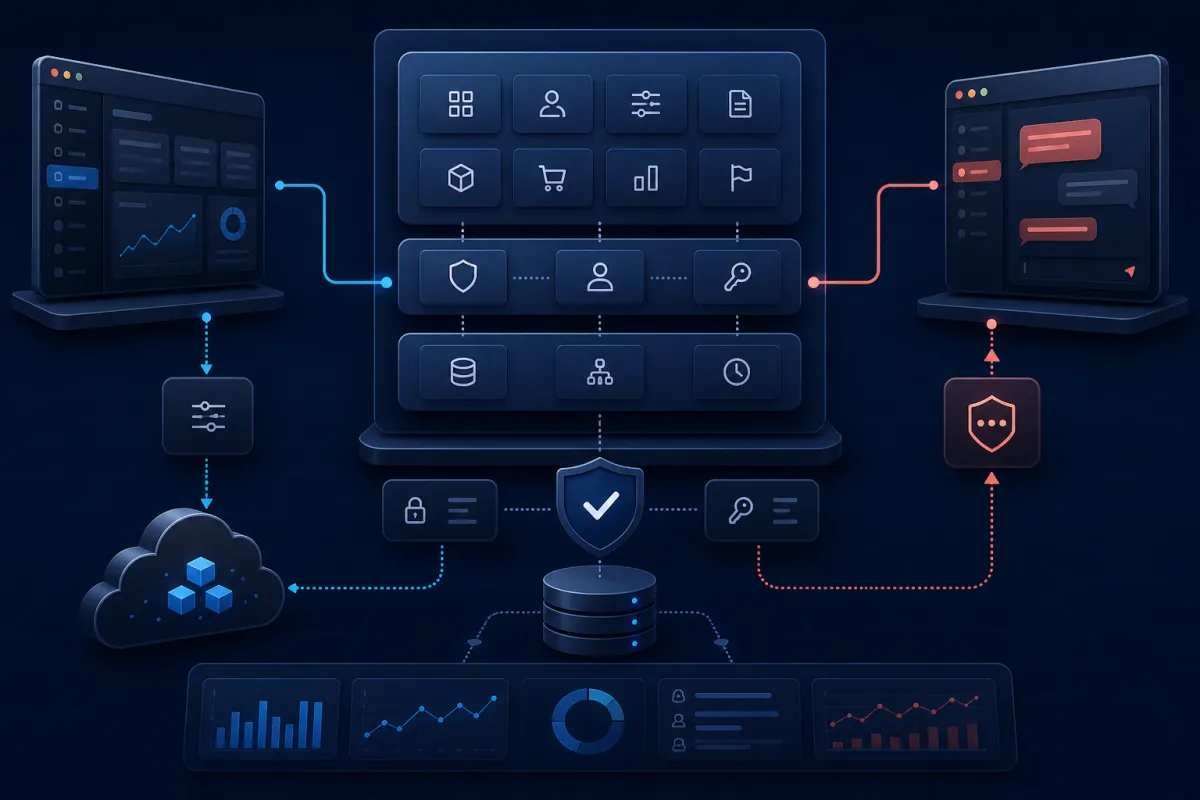
A hybrid design should emerge from two real user needs, not from a desire to include every integration option. A focused custom ChatGPT integration starts by identifying the interfaces and workflows that provide value, then adds only the directions the system needs.
Which One Owns Authentication?
Authentication belongs at different boundaries depending on who initiates the request.
Application-driven OpenAI requests
The user is normally authenticated inside Laravel before any model request occurs. Laravel uses its existing session, token, middleware, policies, gates, roles, and tenant boundaries to determine what the user can access. The provider API key authenticates the application to the AI provider; it does not identify the application user to OpenAI as an authorization mechanism.
Laravel should authorize access before retrieving model context. If a user cannot view a customer record in the normal application, an AI summary endpoint must not retrieve that record merely because the prompt asks for it.
GPT-initiated application requests
A Custom GPT is outside your application's existing browser session. If an Action needs private, user-specific data, the application needs a way to authenticate and authorize the external request. OAuth is often appropriate because it can provide delegated, scoped, expiring, and revocable access tied to a real application account.
Not every Action needs OAuth. A read-only operation over genuinely public data may use no user authentication, and some controlled machine-to-machine use cases may use another API credential model. The decision follows the sensitivity and ownership of the data, not a universal GPT requirement.
Regardless of mechanism, authentication only establishes identity or client authority. Each endpoint must still authorize the requested record and operation.
What About the Database?
Neither architecture should give a model unrestricted database access. The safe pattern is application-mediated data access:
For an OpenAI API feature, Laravel selects the authorized records and sends only the fields needed for inference. For a GPT Action, the API authenticates the request, resolves the user, authorizes access, invokes a domain service, and returns a bounded representation.
A direct GPT → Database path loses the protections the application already provides: tenant scoping, policies, validation, workflow rules, formatting, auditing, and stable API contracts. It also encourages broad data exposure when a specific use case typically needs only a small subset.
The database remains the source of truth for users, customers, orders, billing, permissions, workflow state, and application records. A model may interpret or draft; application code validates and persists authoritative changes.
GPT Actions vs OpenAI API Comparison
| Requirement | OpenAI API integration | GPT Actions |
|---|---|---|
| AI lives inside your application | Best fit | Usually not the primary fit |
| Users interact mainly through ChatGPT | Possible but indirect | Best fit |
| Your application initiates requests | Yes | No |
| ChatGPT initiates application requests | No | Yes |
| Existing Laravel UI stays primary | Yes | Optional |
| External API endpoints required | Not always | Yes |
| OAuth may be needed | Usually not for the provider call | Often for private user data |
| Long or background AI processing | Strong fit with supported execution | Usually starts behind the API |
| Application controls the workflow | Strong control | Shared with GPT interaction |
| OpenAPI contract required | No | Yes |
The table describes typical patterns, not hard platform limits. An Action endpoint can initiate long-running application work and return a status. An application-driven feature can expose its own API to other clients. The initiating interface remains the clearest discriminator.
Three Laravel Architecture Examples
Architecture A — AI inside Laravel
Use this when the user stays in the existing application. Laravel owns identity, context selection, model configuration, result validation, persistence, and fallback behavior.
Architecture B — Custom GPT connected to Laravel
Use this when ChatGPT is the intended interface. Laravel exposes narrow API operations and applies authentication, scopes, policies, validation, and business rules.
Architecture C — Both interfaces
Use this only when both interfaces have distinct value. Keep common business behavior in application services so the dashboard and the Action do not implement competing rules.
Common Mistake: Choosing GPT Actions Because It Is “ChatGPT”
GPT Actions are not automatically the correct choice for every ChatGPT project. If users already operate inside an established SaaS application and want summarization, drafting, search, classification, or document processing on existing screens, the OpenAI API is usually more direct.
Choosing Actions unnecessarily can create a public API surface, OpenAPI maintenance, external authentication, account linking, and a second user interface without solving a user problem. Those are worthwhile investments when ChatGPT should initiate application work, but unnecessary overhead when Laravel already owns the workflow.
The reverse mistake also occurs. A team may build a full conversational interface inside its application even though stakeholders explicitly want to use a Custom GPT. In that case, a well-designed Action over a narrow API may avoid duplicating the chat experience.
Common Mistake: Letting the Model Become the Application
Whether the request moves outward or inward, the model should not silently replace deterministic application responsibilities. Laravel or the existing application should remain responsible for permissions, billing, transactions, persistence, workflow state, validation, and audit history.
For application-driven AI, treat model responses as untrusted external input. Validate structured output, constrain referenced identifiers, and require approval before consequential effects.
For GPT Actions, treat the GPT as an external client. Do not assume the conversation proves identity or permission. Validate every parameter, resolve records within the authenticated tenant, and expose application operations rather than raw database primitives.
AI can interpret language, synthesize context, and help a user choose an operation. Application code should decide whether that operation is allowed and carry it out predictably.
Which Architecture Is Easier to Maintain?
Neither architecture is universally easier. Maintenance depends on whether it matches the interface and operational model.
An OpenAI API integration benefits from a centralized provider client, application-specific AI services, versioned instructions, structured result objects, fake clients for tests, usage tracking, and consistent timeout and failure handling. Model changes can remain behind that boundary.
A GPT Actions integration benefits from stable API versioning, a focused OpenAPI definition, documented authentication, limited scopes, predictable error responses, integration tests, and compatibility discipline. Prompt or GPT configuration changes must remain aligned with the API contract.
A hybrid application has both maintenance surfaces. Shared domain services reduce duplication, but teams must test the Laravel UI path and the GPT/API path independently. The right architecture is maintainable because its complexity corresponds to genuine user interfaces—not because one technology has fewer files.
Security Considerations for Each Direction
OpenAI API integrations
- authorize the user before selecting model context;
- send only the data required for the operation;
- keep provider credentials in protected server configuration;
- set timeouts, budgets, and rate controls;
- validate outputs before display, storage, or action;
- redact sensitive information from logs; and
- provide a fallback when the provider is unavailable.
GPT Actions
- expose only intended API capabilities;
- use OAuth or another appropriate authentication mechanism;
- limit scopes and enforce endpoint-level authorization;
- validate every input regardless of the OpenAPI schema;
- apply tenant boundaries and record policies;
- rate-limit and monitor external calls; and
- require confirmation or application approval for consequential actions.
Security is an application property, not a prompt instruction. The model can participate in a secure workflow only when code and infrastructure enforce the boundary.
Can Coding Agents Build Either Architecture?
Modern coding agents can accelerate both paths. They can draft Laravel service classes, provider clients, API routes, OpenAPI definitions, OAuth flows, test doubles, integration tests, background task units, documentation, and failure cases. They are particularly useful when the architecture and acceptance criteria are explicit.
The agent still needs direction about which interface should initiate the workflow, which existing service owns a business rule, what data may leave the application, how users authenticate, what infrastructure the deployment supports, and which failures require human recovery. Generating an OpenAPI file does not prove that Actions are the right product interface. Generating a provider client does not prove that model inference belongs in the workflow.
Experienced engineering turns coding speed into a system that fits the application. That includes saying “neither” when deterministic search, a form, a report, or an existing API solves the problem more reliably.
A Practical Decision Framework
Start hereWhere will the user primarily interact?
Then test that initial direction with five questions:
- Does ChatGPT need live application data? If yes, an Action needs a controlled API. If the application calls the model, Laravel can select the data itself.
- Does ChatGPT need to change application state? If yes, expose only narrow authorized operations and consider confirmation.
- Does the application need long-running AI processing? If yes, an application-driven service plus an execution mechanism the environment can operate is usually the natural path.
- Does the user already authenticate inside the application? If yes, reuse that identity and authorization for embedded AI features.
- Will GPT users need private account data? If yes, plan OAuth or another appropriate delegated authentication model and strict API authorization.
Finally, ask whether the workflow needs generative AI at all. If the expected result is deterministic, a normal application service, search query, rules engine, report, or API may be easier to test and operate. “Neither” is a valid architecture decision.
Choose the Direction Before Building the Integration
Use the OpenAI API when your application should initiate model work and AI belongs inside the existing product experience. Use GPT Actions when a Custom GPT should initiate controlled requests to your application. Use both when two real interfaces need the same underlying business system. Use neither when a deterministic feature solves the problem better.
For a broader set of business use cases, explore 10 ways to integrate ChatGPT into existing software. Not sure whether your application needs GPT Actions, the OpenAI API, or both? Custom PHP Design can evaluate the existing Laravel or PHP application, user workflow, authentication requirements, data boundaries, and infrastructure, then design appropriate production AI integration services around the system you already operate.
Request an AI Integration Consultation to choose the architecture before implementation complexity hardens around the wrong direction.